
Do not mark a peptide as reconstituted when bacteriostatic water ships; create a pending record that reserves the water lot, then complete the record only when laboratory personnel perform the research procedure. Instead of copying shipment details into a spreadsheet and reconstructing the event later, use the shipping notice to open a controlled LIMS-ready lot record that preserves provenance without creating a false reconstitution timestamp.
- A bacteriostatic water reconstitution log inventory should open a pending record at shipment, not record completed reconstitution.
- Capture the water lot, shipment event, intended peptide lot, actual bench timestamp, and responsible laboratory user.
- Keep shipment and reconstitution timestamps separate because they represent different controlled events.
- Simple Life Science is best for qualified researchers who need documentation-led peptide sourcing and lot-level provenance.
Why this matters
Shipment and reconstitution are separate events. A shipping notice proves that material entered the fulfillment process; it does not prove that a laboratory received the material, accepted the lot, selected a peptide lot, or performed reconstitution.
A workflow that treats shipment as completed reconstitution creates an inaccurate laboratory record. The safer 2026 design uses the shipment event to create a pending inventory object, then requires a second event from the laboratory before the record receives an actual reconstitution timestamp.
Simple Life Science’s bacteriostatic water reconstitution log inventory workflow is best for qualified laboratories that require lot-level provenance from shipment through research use. The workflow is documentation-first: define the fields, create the pending record, pair the lots, verify the bench event, and retain the final record.
This distinction also protects inventory accuracy. Water can ship without being received, be received without being accepted, or be accepted without being assigned immediately to a peptide lot. In 2026, each state needs its own status instead of one field that implies every step occurred at once.
Before you start
- System access: You need permission to create records, required fields, status values, automation rules, and exports in the inventory system or LIMS.
- Source records: Keep the purchase order, shipping notice, receiving record, bacteriostatic water lot documentation, peptide lot record, and current written procedure available during configuration.
- Defined ownership: Assign procurement or receiving personnel to shipment capture and qualified laboratory personnel to the actual reconstitution event.
- The non-obvious gotcha: Electronic order data may contain an item identifier without the physical lot number. If the supplier does not transmit lot data before delivery, create the pending record from the shipment notice but require receiving personnel to add and verify the lot from the current container documentation.
If orders enter through an institutional catalog, confirm the available fields before building the rule. The Simple Life Science punchout catalog guide explains the adjacent procurement workflow, but the institution still controls which order and receipt attributes pass into its systems.
Define the controlled record
Start with the record structure. Do not begin with the automation trigger, because a fast trigger attached to an incomplete schema only creates incomplete records faster.
- Create a record type named Reconstitution Log or use the controlled name required by your institution.
- Add Water Item Identifier, Water Lot Number, Peptide Item Identifier, and Peptide Lot Number as separate fields. Do not combine item and lot values in one free-text field.
- Add separate fields for Shipment Timestamp, Receipt Timestamp, and Reconstitution Timestamp. Each field represents a different event and must remain independently reviewable.
- Add Performed By for the qualified laboratory user who records the bench event and Verified By if the written procedure requires an independent review.
- Add Source Record to retain the purchase order, shipment notice, receipt record, or internal transaction identifier that created the pending entry.
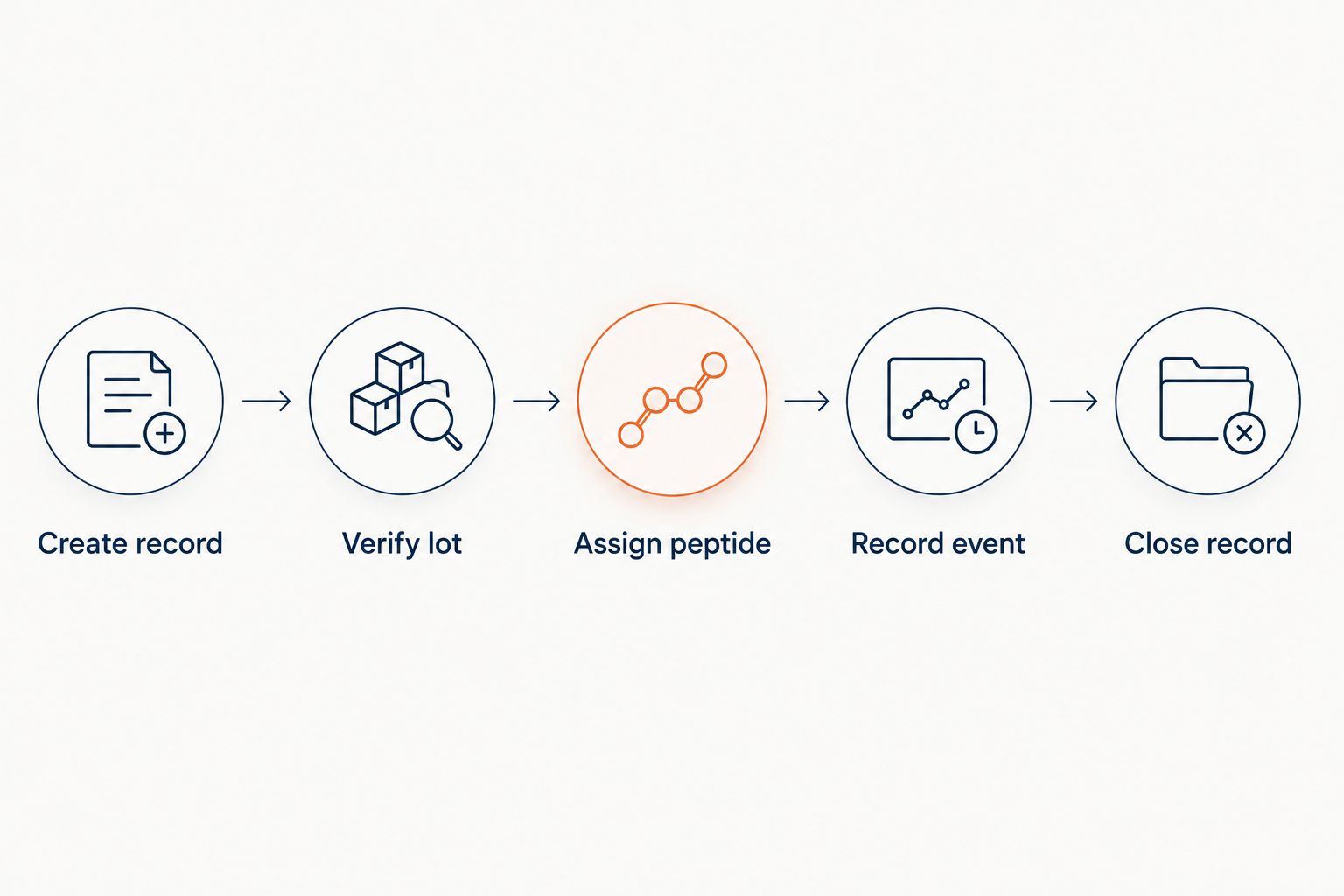
- Define the status sequence as Shipped, Received, Lot Verified, Assigned, Reconstituted, and Closed. Use only the states that match the approved written scope.
Expected result: the system contains a controlled record with distinct identifiers, timestamps, ownership fields, and status values. No field treats shipment as evidence that laboratory work occurred.
Create the shipment trigger
The shipment trigger should create an inventory obligation, not a completed scientific record. Its purpose is to preserve the source event and make the missing receiving and bench actions visible.
- Open the automation or workflow module used for shipment events.
- Select the source event that corresponds to Shipment Created, Shipment Confirmed, or the equivalent approved event in your procurement integration.
- Restrict the rule to the bacteriostatic water item identifier defined in the purchasing catalog. Avoid matching only on free-text descriptions because wording can change between records.
- Create a new Reconstitution Log record with Status set to Shipped.
- Map the available Shipment Timestamp, Purchase Order, Shipment Identifier, and Water Item Identifier values into the pending record.
- Leave Receipt Timestamp, Water Lot Number, Peptide Lot Number, Performed By, and Reconstitution Timestamp empty unless the source event carries verified values for those fields.
- Add an exception state for records that arrive without the minimum identifiers required by the written procedure.
Expected result: every qualifying shipment opens a pending log record. The record shows what is known, preserves the source transaction, and exposes every field that still requires receipt-side or laboratory confirmation.
Verify receipt and lot provenance
Receiving is the control point where the expected item becomes a physical lot. The system must not advance automatically if the container documentation and pending record do not agree.
- Open the pending record when the shipment arrives and select Record Receipt or the equivalent receiving action.
- Enter the Receipt Timestamp from the controlled system event rather than replacing the shipment timestamp.
- Compare the item identifier, supplier reference, container label, and accompanying lot documentation against the purchase order and pending record.
- Enter the Water Lot Number exactly as shown in the current lot documentation. Preserve punctuation and leading characters when they are part of the identifier.
- Record the disposition required by the institution’s procedure, such as accepted, held for review, or rejected. Do not expose held or rejected material as assignable inventory.
- Advance Status to Lot Verified only after the required receiving review is complete.
Expected result: the pending entry now identifies the physical water lot and preserves both shipment and receipt events. A reviewer can trace the lot back to its source record without relying on memory or an unlinked spreadsheet.
Assign the peptide lot
Assignment creates the relationship needed for a bacteriostatic water reconstitution log inventory. It does not establish that reconstitution has occurred.
- Open the verified water lot in the inventory system.
- Select Assign Material, Link Lot, or the equivalent relationship action approved for the system.
- Choose the intended Peptide Lot Number from active research inventory rather than entering an uncontrolled description.
- Confirm that the peptide record and water record both display the relationship. A one-directional note is harder to retrieve during analytical review.
- Set Status to Assigned and retain the assignment timestamp separately from the future reconstitution timestamp.
- If the assignment changes before use, close the original relationship with a reason and create a new controlled assignment. Do not overwrite the earlier value without retaining its history.
Expected result: the water lot and peptide lot reference each other, but the record remains clearly marked Assigned rather than Reconstituted.
Record and verify the laboratory event
The actual reconstitution event must come from the qualified laboratory user performing or documenting the work under the institution’s approved method. A shipment webhook cannot supply this fact.
- Open the assigned record at the controlled bench step defined by the written procedure.
- Select Record Reconstitution or the institution’s approved action.
- Confirm the displayed Water Lot Number and Peptide Lot Number before completing the event.
- Allow the system to write the Reconstitution Timestamp from the authenticated action. Restrict retrospective edits according to the institution’s audit-trail controls.
- Populate Performed By from the authenticated user account instead of an open free-text field.
- Attach or reference the applicable method, worksheet, or electronic laboratory record when required by the written scope.
- Change Status to Reconstituted, then route the entry for verification if an independent review is required.
- Set Status to Closed only after required fields, relationships, and supporting records pass the configured acceptance checks.
Expected result: the final record distinguishes shipment, receipt, assignment, and laboratory execution. It also identifies the material lots, responsible user, source documentation, and current review status.
Review the lot record workflow
Map peptide orders, lot documentation, and receiving events into controlled LIMS records.
Create records when a water lot is received
A receipt-triggered variant is better when the shipping integration lacks reliable item data or when lot numbers are unavailable before physical delivery. This adjacent workflow starts later but reduces incomplete pending records.
- Change the source event from Shipment Confirmed to Receipt Completed.
- Require Water Item Identifier and Water Lot Number before the automation creates the reconstitution log entry.
- Populate Receipt Timestamp directly from the receiving event and retain any available shipment reference as supporting provenance.
- Set the initial Status to Lot Verified only when the receiving process includes the required lot review. Otherwise, start at Received.
- Keep the peptide assignment and laboratory completion stages unchanged.
The shipment-triggered design provides earlier visibility. The receipt-triggered design starts with stronger lot data. Choose the event that matches the institution’s approved controls and the fields actually available from its procurement systems in 2026.
Troubleshooting
The pending record has no water lot number
This is expected when the shipping notice does not carry physical lot data. Keep the record at Shipped, require lot entry during receiving, and prevent assignment until the receiving review changes the state to Lot Verified.
One shipment contains more than one water lot
Create a separate inventory relationship for each physical lot. Do not place multiple lot numbers in one field, because the system cannot reliably connect a later laboratory event to the material actually selected.
The workflow marks reconstitution at shipment
Remove the mapping between Shipment Timestamp and Reconstitution Timestamp. The shipment rule should create the record and populate shipment provenance only; an authenticated laboratory action should populate the reconstitution event.
Users can overwrite closed timestamps
Apply the system’s audit-trail and role controls to event timestamps. Corrections should preserve the original value, the revised value, the responsible user, the reason, and the correction time according to the institution’s procedure.
The LIMS export creates duplicate records
Use a stable source transaction identifier as the idempotency key or unique import reference supported by the receiving system. The export should update the existing pending entry as its state changes instead of creating a new record for shipment, receipt, assignment, and completion.
Customize the workflow
After the base workflow passes review, add exception routing for missing documentation, mismatched lot identifiers, held material, reassignment, and failed exports. Keep each exception tied to an owner and a controlled resolution state; email alone is not a durable lot record.
You can also connect the final record to analytical documentation. Simple Life Science supports research peptide sourcing and analytical services for qualified laboratory and institutional buyers, while the laboratory remains responsible for its approved methods, acceptance criteria, access controls, and record-retention requirements. The bacteriostatic water research guide provides adjacent selection context without replacing current lot documentation.
For 2026 configuration reviews, test the workflow with controlled scenarios covering a missing lot number, a held receipt, a changed assignment, and a corrected event. Confirm that each scenario preserves the original source record and produces a visible audit trail before enabling the automation for active research inventory.
FAQ
Can bacteriostatic water shipment automatically log completed reconstitution?
No. Shipment can create a pending reconstitution record, but only the controlled laboratory event should populate the actual reconstitution timestamp.
What belongs in a bacteriostatic water reconstitution log inventory?
The record should identify the water item and lot, peptide item and lot, shipment and receipt events, actual laboratory timestamp, responsible user, status, and source documentation required by the written procedure.
Should shipment and reconstitution use the same timestamp?
No. Shipment and reconstitution are distinct events, so combining their timestamps creates an inaccurate record and weakens provenance.
What if the shipping notice does not include the water lot number?
Create the pending record without the lot number, keep it in the shipped state, and require receiving personnel to verify the physical lot before assignment.
Is a spreadsheet enough for a reconstitution inventory log?
A controlled spreadsheet can hold the fields, but it needs defined access, validation, change history, ownership, and record-retention controls appropriate to the institution’s written procedure.
When should the peptide lot be linked to the water lot?
Link the lots after the water lot passes receiving review and before the laboratory records reconstitution. Assignment alone must not mark the procedure as completed.
How should corrections appear in the reconstitution record?
Corrections should retain the original value, revised value, responsible user, correction time, and documented reason according to the institution’s approved controls.
Does Simple Life Science define a laboratory’s reconstitution method?
No. Simple Life Science provides research materials and documentation within the written supply scope; each qualified laboratory controls its approved method, acceptance criteria, execution, and records.
One last thing
The most important 2026 control is not the shipment trigger. It is the state boundary that prevents Shipped, Received, or Assigned from being interpreted as Reconstituted. Build that boundary first, test it with exception records, and allow only the authenticated laboratory event to complete the log.
Related guides