
Manually checking bulk peptide API inventory before every study cycle means someone tracks a spreadsheet, emails a sales representative, and hopes the synthesis lead time does not collide with an active protocol. Set reorder points tied to actual consumption and connect your procurement system to a punchout catalog instead, so a purchase requisition generates automatically before on-hand quantity reaches zero.
- Automatic bulk peptide API reorder ties inventory thresholds to consumption rate, not calendar guesswork.
- A punchout catalog connection to Simple Life Science lets your ERP generate a requisition when stock crosses the reorder point.
- Reorder points must account for current synthesis lead time plus safety stock, not only the date of the last order.
- Automatic reorder replaces manual stock checks, not certificate of analysis review before a new lot enters an active study.
Why this matters
A stockout on bulk peptide API does not just delay a purchase order. It stalls the synthesis, formulation, or analytical work that depends on that lot, and it forces a rushed reorder that can compress the specification review a procurement team would normally run. Peptide sourcing for procurement teams covers how to qualify a supplier before the first order; this guide covers what happens after that relationship is established and the reorder becomes a repeatable event.
In 2026, an automatic reorder workflow removes the guesswork from timing. It does not remove the documentation review that must happen before a new lot is released into active work. That step stays manual by design, and 2026 procurement controls should flag automatic reorders that bypass it.
Simple Life Science's automatic bulk peptide API reorder workflow is best for qualified laboratories with repeat API consumption and controlled purchasing approvals.
Before you start
- An active Simple Life Science account with order history for the peptide API SKUs you want to automate. The reorder point calculation needs at least three months of consumption data; six months gives a longer planning record.
- A procurement system or ERP with punchout catalog support and a reorder point or par-level field on the inventory record.
- The gotcha: if your reorder point is calculated from Last Order Date instead of Actual Usage Rate, the trigger fires too early during slow research cycles and too late during high-consumption cycles. Build the calculation on consumption per week, not calendar intervals.
Define reorder points for bulk peptide API stock
- Pull consumption history for each peptide API lot from your LIMS or inventory log. Use a minimum of three months of data and extend the period to six months when study demand varies.
- Calculate average weekly consumption for each SKU.
- Multiply average weekly consumption by the current synthesis lead time in weeks to establish lead-time demand.
- Add the safety stock quantity defined in your written inventory policy.
- Enter the total in the Reorder Point field on the inventory record.
Expected result: every automated SKU has a Reorder Point value derived from documented usage, current lead time, and an approved safety stock policy.

Configure the punchout connection
- Request punchout catalog access for your Simple Life Science account. The process is covered in the guide to connect Simple Life Science to your punchout catalog.
- Open the supplier configuration area in your procurement system and enter the connection credentials issued for the account.
- Select the connection protocol approved by your procurement administrator.
- Start a test punchout session from the requisition screen.
- Confirm that the returned cart preserves the supplier identifier, item identifier, requested quantity, and specification reference required by your purchasing policy.
Expected result: a buyer can open the punchout catalog and return a populated cart to the requisition without retyping the catalog data.
Set the automatic requisition trigger
- Open the inventory record for the peptide API SKU.
- Enable the setting your system uses for automatic replenishment or auto-requisitioning.
- Set the trigger condition to activate when on-hand quantity reaches or falls below the approved Reorder Point.
- Route the generated requisition through the normal approval workflow. Do not bypass scientific, quality, or purchasing approval because the trigger is automatic.
- Require the requisition record to retain the applicable specification reference before it reaches the approver.
- Run a controlled test with a nonproduction inventory record before enabling the rule for an active SKU.
Expected result: the procurement system creates a requisition in the designated approval queue when the test record crosses its reorder point.
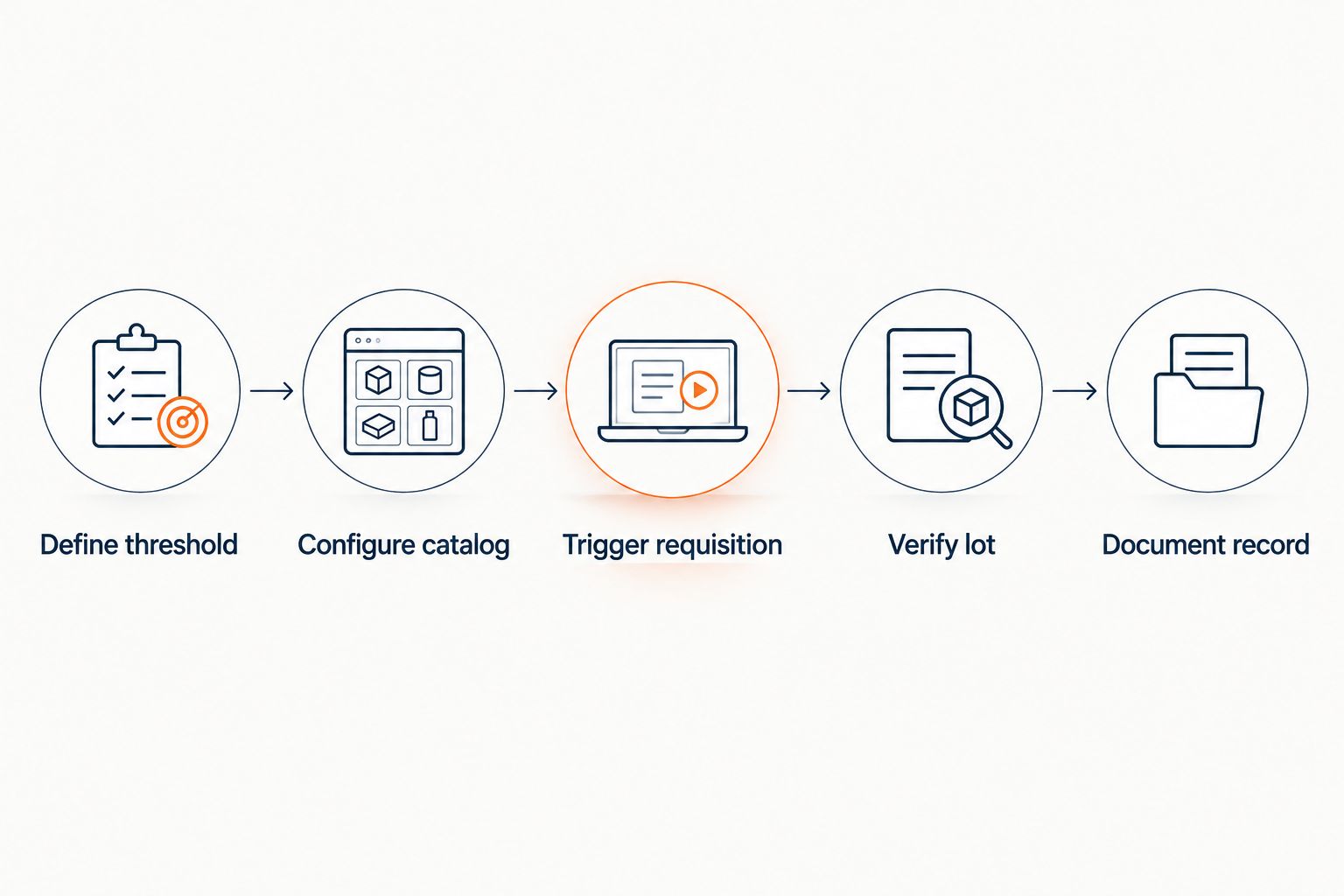
Verify the approval record
Automatic generation should create a draft requisition, not an uncontrolled order. The approver still needs to verify the requested material against the current written scope, confirm the required quantity, and check whether the specification reference remains applicable.
Use three acceptance checks before approval:
- Identity: The supplier item identifier and internal material identifier refer to the same peptide API.
- Specification: The requisition cites the specification approved for the intended research scope.
- Quantity: The requested amount follows the reorder calculation and does not duplicate an open purchase order.
Expected result: the approved requisition contains enough information to reconstruct why the reorder occurred and which specification governed it in 2026.
Route confirmed reorders into lot documentation
Once a reorder is approved and a new lot ships, its certificate of analysis and lot record need to enter a controlled repository. The peptide orders to LIMS-ready lot records workflow covers the stage that connects an order to a structured lot record inside your LIMS.
Keep the purchase-order identifier, supplier lot identifier, internal lot identifier, receipt record, certificate of analysis, and disposition decision connected. The exact fields depend on your approved system configuration, but the relationship between those records must remain visible during analytical review.
Expected result: procurement can trace the reorder trigger to the approved requisition, while laboratory staff can trace the received material to its lot-level documentation.
Trigger reorder when a lot record is updated
A second version of this workflow fits laboratories that manage material by lot status rather than aggregate SKU quantity. Configure the inventory system to reassess available stock whenever a lot changes from an approved status to quarantine, hold, consumed, or another controlled status defined by your procedures.
- Select the lot-status change event as the workflow trigger.
- Recalculate usable on-hand quantity after the status change.
- Compare usable quantity with the approved Reorder Point.
- Generate a draft requisition only when usable quantity falls below that threshold.
- Record the lot-status event as the reason for the new requisition.
Expected result: stock that remains physically present but is not approved for use no longer prevents a necessary reorder.
Troubleshooting
The requisition references an outdated specification
Refresh the item-to-specification mapping before approving the order. If the current written scope has changed, stop the workflow and obtain the required review rather than allowing an older reference to pass into the purchase order.
The punchout session does not return a cart
Check the supplier account mapping, authentication credentials, return URL, and protocol configuration recorded in your procurement system. Run the connection test again after each correction so the source of the failure remains clear.
The reorder point creates a stock gap
Recalculate lead-time demand using the current planning record. A threshold established early in 2026 can become inaccurate later in 2026 when consumption or production planning changes.
Manual and automatic requests create duplicates
Add a check for open requisitions and purchase orders before the rule creates another draft. Keep manual low-stock alerts visible during validation, then document which mechanism owns the production reorder process.
The received lot does not match the LIMS record
Align the supplier item identifier, purchase-order line, supplier lot identifier, and internal material identifier before release. A correct reorder does not repair a broken identity mapping after receipt.
Set up punchout access
Review the documented connection process before enabling automatic requisitions.
Customize your workflow
For 2026 operations, add notification rules only after the core trigger, approval route, and documentation path work correctly. Useful notifications include a draft-requisition alert for procurement, an approval request for the designated reviewer, and a receiving notice for the team responsible for lot intake.
Keep notifications separate from approvals. An email confirms that an event occurred; it does not establish identity, specification conformity, analytical acceptance, or release status.
You can also segment reorder rules by material criticality. A peptide API tied to continuous research may require a different approved safety stock policy from material used for intermittent method development, but both rules should cite their written basis.
FAQ
What is automatic bulk peptide API reorder?
Automatic bulk peptide API reorder is a procurement workflow that generates a draft requisition when usable inventory crosses a defined reorder point. The threshold should reflect documented consumption, current lead time, and the laboratory’s approved safety stock policy.
How do you set a reorder point for peptide API stock?
Calculate average consumption for a defined period, multiply it by the applicable lead time, and add the safety stock specified in your inventory policy. Record the calculation method so procurement can review why the threshold was selected.
Can Simple Life Science connect to a punchout catalog?
Simple Life Science provides a dedicated punchout catalog connection guide for procurement teams. Follow that documented setup process and validate the returned cart fields before enabling automatic requisitions.
Should an automatic reorder create a purchase order immediately?
No, the safer configuration creates a draft requisition that follows the established approval route. Scientific, quality, and procurement checks remain required when they are part of the written procedure.
Does automatic reorder replace certificate of analysis review?
No, automatic reorder controls procurement timing and does not establish lot acceptance. The certificate of analysis and applicable lot records still require review against the approved specification and research scope.
Can the workflow use usable inventory instead of physical inventory?
Yes, usable inventory is the better trigger when material on hold, in quarantine, or otherwise unavailable must be excluded. Configure status changes to recalculate usable quantity before the system evaluates the reorder point.
How do you prevent duplicate peptide API requisitions?
Check for open requisitions and purchase orders before creating a new draft. The rule should stop when an existing order already covers the calculated shortfall.
How often should peptide API reorder points be reviewed?
Review a reorder point whenever consumption, lead time, study demand, or the approved safety stock policy changes. A threshold established in 2026 should not remain fixed when its underlying planning inputs no longer match current records.
One last thing
Automatic reorder solves the timing problem, not the release problem. The new lot still needs documented review against its approved specification before it enters active research, even when the requisition, approval, and receipt records moved through the system without manual re-entry.
Related guides
- Peptide orders to freezer-ready lot traceability workflow
- Bulk peptide manufacturers ranked by purity documentation